If you are looking to update the password, change the allocated storage, or suspend a user, this guide will help you.
First, you will need to log into your DirectAdmin Panel.
Navigate to “E-mail Manager” > “E-mail Accounts”
Head to E-mail Accounts under E-mail. You will see a list of active E-mail Accounts that are linked via that domain.
Resetting your email password
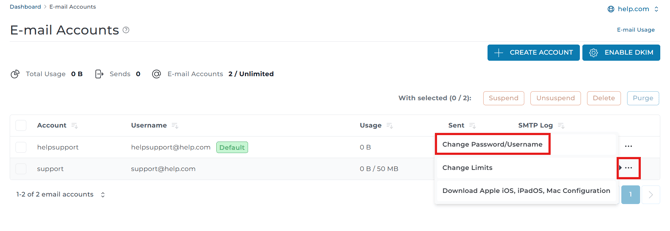
To reset your email password, click the “⋯” Icon/Button next to the mailbox you want to reset the password for, then click “Change Password/Username”
Enter a new password in the box under Password. Alternatively, you can click the dice icon on the left to generate a new randomized password.
Note: you do not need to click generate if you entered a custom password.
Changing the storage allocation
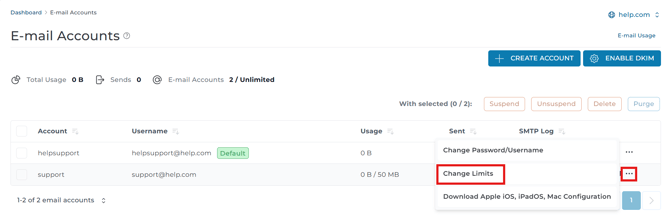
To change your storage allocation for an E-Mail account, select the mail address that you require to reset via the checkbox icon, then click the “⋯” Icon/Button on the right-hand side of the mailbox. Click “Change Limits”
Here you can change the storage limit for your E-Mail account and Daily Send Limit. Once you have changed your settings click “Save”.
If your email account is hitting its storage limit, you can enter a larger amount in the “Allocated Storage Space” field or set the storage allocation to unlimited in order for your email account to make full use of the storage allocations of your hosting account with us.
Suspending an email account
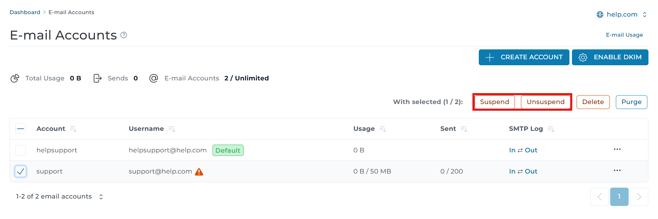
You can suspend a user’s ability to log into their email account or their ability to send or receive emails using this page by toggling the settings between “Unsuspend” and “Suspend”. You can do this by selecting the mail address that you require to reset via the checkbox icon, then click the “Suspend/Unsuspend” at the top of the E-Mail Accounts list.
The result will be as shown below.